Advantages of Digital Data Storage: Store Data Safely and Digitally
Digital Data Storage: Benefits and Best Practices
Digital data storage means keeping information in electronic format rather than on paper. It saves space, improves access, enhances security, and makes backup and recovery possible.
Here is why digital storage matters, how to implement it, and what to consider when choosing storage solutions.
Why Digital Storage Beats Paper
Benefits of Digital Data Storage
Space Efficiency
A single hard drive can store millions of documents. The same information on paper would fill rooms or entire buildings.
For businesses, this translates to:
Lower real estate costs
No need for file room staff
Cleaner, more productive workspaces
Ability to scale without physical expansion
Instant Access and Search
Digital documents can be found in seconds using search. No more digging through filing cabinets or hoping someone filed things correctly.
Search capabilities include:
Full-text search within documents
Metadata search (date, author, type)
Tag and category filtering
Advanced query operators
This speed transforms how work gets done. Information that took hours to find is now available immediately.
Easy Sharing and Collaboration
Digital files can be shared instantly with anyone, anywhere. Multiple people can access the same document simultaneously without making copies.
Collaboration features include:
Real-time editing
Version tracking
Comments and annotations
Permission controls
For team communication strategies, see our guide on community engagement best practices.
Backup and Disaster Recovery
Paper documents destroyed by fire, flood, or other disasters are gone forever. Digital documents can be backed up to multiple locations.
Proper backup strategy includes:
Regular automated backups
Off-site backup copies
Multiple backup generations
Tested recovery procedures
With good backups, you can recover from hardware failure, ransomware attacks, accidental deletion, or natural disasters.
Enhanced Security
Digital storage offers security capabilities impossible with paper:
Encryption at rest and in transit
Granular access permissions
Audit logs tracking who accessed what
Automatic expiration for sensitive documents
Remote wipe capabilities
For email security specifically, see our guide on email security tips.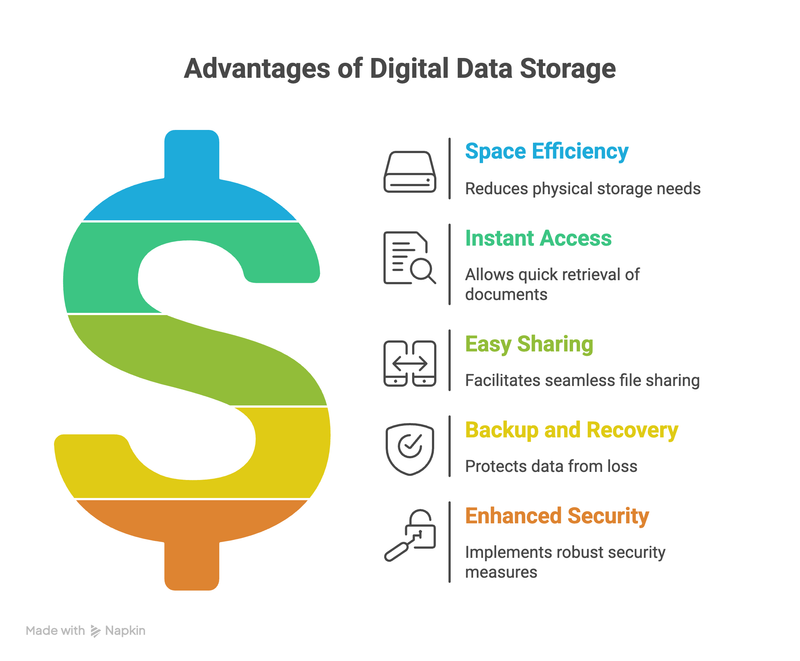
Types of Digital Storage
Local Storage
Storage on devices you physically control:
Hard drives (HDD)
Solid state drives (SSD)
Network attached storage (NAS)
On-premises servers
Advantages:
Full control over data
No ongoing subscription costs
Fast access for local users
No internet dependency
Disadvantages:
Hardware costs and maintenance
Physical disaster risk
Limited remote access
Scaling requires hardware purchases
Cloud Storage
Storage on remote servers managed by a provider:
General cloud storage (Google Drive, Dropbox, OneDrive)
Enterprise cloud solutions (AWS, Azure, Google Cloud)
Specialized industry solutions
Advantages:
No hardware to maintain
Easy remote access
Built-in redundancy
Scales on demand
Predictable monthly costs
Disadvantages:
Ongoing subscription fees
Dependent on internet connectivity
Data resides on third-party servers
Less direct control
Hybrid Storage
Combination of local and cloud storage. Common approaches:
Keep frequently accessed files local, archive to cloud
Primary storage local with cloud backup
Sensitive data local, general data in cloud
Hybrid approaches balance control, cost, and convenience.
Choosing the Right Storage Solution
Consider Your Needs
For Small Businesses
Start simple:
Cloud storage for document sharing (Google Workspace, Microsoft 365)
External drives for local backup
Automatic cloud backup service
This provides good functionality without IT complexity.
For Larger Organizations
More sophisticated needs require:
Enterprise cloud solutions or on-premises infrastructure
Document management systems
Formal backup and recovery procedures
Compliance and audit capabilities
IT staff or managed services
For business growth strategies, see our guide on growing your business with email nurture campaigns.
Document Management Systems
A document management system (DMS) adds organization and workflow capabilities to raw storage.
Key Features
Organization: Folder structures, tags, metadata, categories
Version control: Track changes, restore previous versions, see who changed what
Access control: Permissions by user, group, or document
Search: Full-text search, filters, saved searches
Workflow: Approval processes, routing, notifications
Integration: Connect with other business systems
Popular Options
Choose based on your specific needs, existing tools, and budget.
Security Best Practices
Access Control
Implement least-privilege access (people only access what they need)
Use strong authentication (complex passwords, two-factor authentication)
Regularly review and update permissions
Remove access immediately when people leave
Encryption
Encrypt data at rest (stored data)
Encrypt data in transit (data being transferred)
Manage encryption keys securely
Use strong encryption standards (AES-256)
Monitoring and Auditing
Log all access to sensitive data
Monitor for unusual access patterns
Regular security audits
Incident response procedures
For data-driven approaches to security and marketing, see our guide on data-driven marketing insights.
Backup Strategy: The 3-2-1 Rule
A solid backup strategy follows the 3-2-1 rule:
3 copies of your data
2 different storage types
1 copy off-site
Example Implementation
Primary: Working files on your computer or server
Local backup: External drive or NAS with automated daily backup
Off-site backup: Cloud backup service or remote location
Backup Best Practices
Automate backups (do not rely on manual processes)
Test recovery regularly (backups you cannot restore are worthless)
Encrypt backup data
Keep multiple backup generations (not just the most recent)
Document your backup and recovery procedures
Transitioning from Paper to Digital
Assessment
Inventory existing paper documents
Identify what must be retained
Determine digitization priority
Estimate time and resources needed
Digitization Process
Sort and organize paper documents
Scan using document scanners (or hire a scanning service)
Apply OCR (optical character recognition) for searchable text
Organize digital files with consistent naming and folders
Verify quality and completeness
Dispose of paper following retention policies
Ongoing Practices
Create digital originals (avoid printing then scanning)
Establish naming conventions
Train staff on new processes
Regularly review and clean up files
Compliance Considerations
Different industries have different requirements for data storage:
Healthcare (HIPAA)
Strict access controls for patient data
Encryption requirements
Audit trail obligations
Retention period requirements
Financial Services
SEC, FINRA, and other regulatory requirements
Long retention periods for certain records
Audit and examination requirements
Legal
Document retention policies
E-discovery capabilities
Chain of custody documentation
General Business (GDPR, CCPA)
Data minimization (do not store what you do not need)
Right to deletion
Breach notification requirements
Consent documentation
Consult with compliance experts for your specific requirements.
Cost Considerations
Upfront vs Ongoing Costs
Local storage:
Higher upfront costs (hardware, setup)
Lower ongoing costs (no subscriptions)
Periodic refresh costs (hardware replacement)
Cloud storage:
Lower upfront costs
Predictable monthly fees
Costs scale with usage
Hidden Costs to Consider
IT staff time for management
Training for new systems
Migration and setup
Integration with existing systems
Compliance and security tools
Calculating ROI
Digital storage often pays for itself through:
Reduced physical storage costs
Staff time savings (faster access, less filing)
Improved collaboration and productivity
Reduced risk of document loss
Better compliance and audit capabilities
Common Mistakes to Avoid
No Backup Strategy
"It is on the computer" is not a backup strategy. Hardware fails. Ransomware encrypts files. Accidents happen. Always have backups.
Poor Organization
Digital storage without organization just moves the mess from filing cabinets to hard drives. Establish naming conventions, folder structures, and cleanup processes.
Ignoring Security
Default settings are rarely secure. Implement access controls, encryption, and monitoring appropriate to your data sensitivity.
No Testing
Backup systems that have never been tested may not work when needed. Recovery procedures that have never been practiced will be slow and error-prone. Test regularly.
Keeping Everything Forever
Storage seems cheap until you have too much data to manage. Establish retention policies and delete what you do not need.
For using customer data effectively, see our guide on using customer data to improve experience.
FAQs
What is digital data storage?
Digital data storage means keeping information in electronic format on devices like hard drives, solid state drives, or cloud servers rather than on paper or other physical media.
What are the benefits of digital storage?
Benefits include space efficiency, instant access and search, easy sharing, reliable backup and disaster recovery, enhanced security, and lower long-term costs.
Is cloud storage safe?
Reputable cloud providers implement strong security measures including encryption, access controls, and redundancy. For most organizations, cloud storage is safer than local storage managed without dedicated IT expertise. Evaluate providers carefully and implement appropriate access controls.
How do I choose between local and cloud storage?
Consider your security requirements, budget, technical resources, and access needs. Many organizations use hybrid approaches combining local and cloud storage for different purposes.
How often should I back up data?
Critical data should be backed up daily at minimum. Some systems use continuous backup. The right frequency depends on how much data you can afford to lose and how often it changes.
How long should I keep documents?
Retention periods depend on document type, legal requirements, and business needs. Some documents have legally mandated retention periods. Establish formal retention policies and follow them consistently.
Need help with digital strategy? Inagiffy helps businesses build systems that organize information and engage audiences. Learn more.