Are Email Addresses Case Sensitive? (Short Answer
Arnav Jalan
email marketing
You're filling out a form and you type "John.Smith@Gmail.com" instead of "john.smith@gmail.com." Will the email still go through? Will someone else get it?
Key Takeaways
Why No Email Provider Bothers with Case Sensitivity — Imagine the chaos if case sensitivity were enforced.
Is Gmail Case Sensitive? — No.
Is Outlook Case Sensitive? — No.
Is Yahoo Mail Case Sensitive? — No.
What About Apple iCloud Email? — No.
What About Custom Domain Emails? — If your email runs on a custom domain (like you@yourcompany.com), case sensitivity depends on the mail server software running on that domain.
The short answer is no, email addresses are not case sensitive in practice. Whether you type your email in all caps, all lowercase, or a mix of both, it'll end up in the same inbox.
But there's a slightly longer answer that explains why this question keeps coming up and where capitalization technically could matter.
The Technical Answer: It Depends on Which Part
An email address has two parts separated by the @ symbol:
local-part@domain
For example, in john.smith@gmail.com:
john.smith is the local part (before the @)
gmail.com is the domain part (after the @)
Each part follows different rules.
The domain part (after the @) is always case insensitive. Gmail.com, GMAIL.COM, and gmail.com are the same thing. DNS (the system that routes internet traffic) doesn't care about capitalization. This is defined in internet standards and every email server follows it.
The local part (before the @) is technically case sensitive according to the RFC 5321 standard. In theory, "John" and "john" could be different mailboxes on the same server.
In practice? No major email provider treats the local part as case sensitive. Gmail, Outlook, Yahoo, Apple Mail, ProtonMail, and every other provider you've heard of treat John.Smith and john.smith as address.
So while the technical specification allows case sensitivity in the local part, virtually no one implements it that way.
Why No Email Provider Bothers with Case Sensitivity
Imagine the chaos if case sensitivity were enforced. You'd have 52 possible variations for each letter in an email address. Someone could create john.smith@gmail.com, John.Smith@gmail.com, and JOHN.SMITH@gmail.com as three separate accounts, receiving completely different emails.
Users would forget which capitalization they used. Support teams would drown in "I can't access my account" tickets. People would accidentally send sensitive information to the wrong variation of an address.
Email providers decided decades ago that the headache wasn't worth it. Treating the local part as case insensitive eliminates an entire category of user errors and security issues.
If you're dealing with email delivery problems that aren't about capitalization, our email deliverability troubleshooting guide covers the issues that actually affect whether your emails reach inboxes.
Is Gmail Case Sensitive?
Gmail also ignores dots in the local part. john.smith@gmail.com, j.o.h.n.s.m.i.t.h@gmail.com, and johnsmith@gmail.com are all address. This is unique to Gmail — most other providers treat dots as significant characters.
Google Workspace (formerly G Suite) email addresses follow rules. If your company uses Google Workspace, capitalization doesn't matter for your @yourcompany.com addresses either.
Is Outlook Case Sensitive?
No. Microsoft Outlook and Outlook.com treat email addresses as case insensitive. Whether someone types your address as user@outlook.com or USER@Outlook.com, the message goes to the same place.
This applies to all Microsoft email domains: outlook.com, hotmail.com, live.com, and custom domains hosted on Microsoft 365.
If you're having Outlook-specific issues, they're more likely related to rendering or deliverability than capitalization. Our guide on email deliverability tips covers common problems and fixes.
Is Yahoo Mail Case Sensitive?
No. Yahoo Mail ignores capitalization in both the local part and domain. Your.Name@yahoo.com and your.name@yahoo.com deliver to inbox.
What About Apple iCloud Email?
No. Apple's iCloud email (@icloud.com, @me.com, @mac.com) is case insensitive. Capitalization doesn't matter.
What About Custom Domain Emails?
If your email runs on a custom domain (like you@yourcompany.com), case sensitivity depends on the mail server software running on that domain.
In practice, every modern mail server — Microsoft Exchange, Google Workspace, Zoho Mail, Fastmail, Postfix, Sendmail — handles email addresses as case insensitive. You'd have to go out of your way to configure a mail server to enforce case sensitivity, and doing so would create more problems than it solves.
If you're managing email infrastructure for your business, our guide on email marketing API integration covers how to set up reliable email systems.
When Capitalization Might Cause Problems
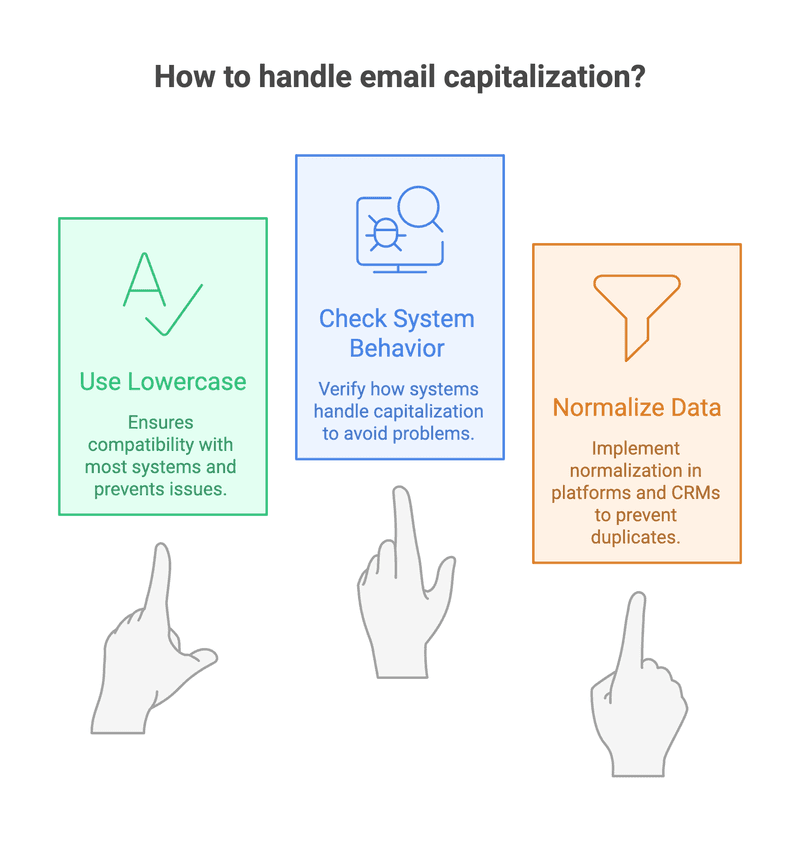
Even though aren't case sensitive in delivery, capitalization can cause issues in other places.
Form validation and login systems. Some websites and apps store exactly as typed and compare them case-sensitively when you try to log in. You might sign up with John@gmail.com and then fail to log in with john@gmail.com because the system does a strict string match. This is a bug in the website's code, not an email standard — but it happens often enough to be annoying.
Email marketing platforms. Most email platforms (Mailchimp, ConvertKit, etc.) normalize addresses to lowercase when importing. But if a platform doesn't do this, you could end up with duplicate entries — john@gmail.com and John@gmail.com showing as two different subscribers. Always check that your platform normalizes on import.
CRM and database systems. Similar to marketing platforms, CRMs might create duplicate contact records if they don't normalize . If you're seeing duplicate contacts, inconsistent capitalization in email addresses is one of the first things to check.
Autoresponders and automation triggers. If an automation rule looks for an exact email match (including case), capitalization differences could prevent the automation from firing. Our guide on email marketing automation workflows covers how to set up automations that work reliably.
Best Practices for Handling Email Address Capitalization
Always store email addresses in lowercase. When collecting through forms, convert them to lowercase before storing. This prevents duplicate records and case-matching issues down the line.
Normalize on import. Before importing email lists into any platform, run a quick lowercase conversion on the email column. Most spreadsheet tools handle this with a simple formula (=LOWER() in Excel or Google Sheets).
Don't display email addresses in all caps. When showing in your UI, use the original case or lowercase. All caps looks like shouting and can confuse users.
Test your forms. Try signing up with mixed-case and make sure everything works — confirmation emails, login, password reset, the whole flow.
Tell users it doesn't matter. If someone asks "does it matter if I capitalize my email?" on a signup form, the answer is always no. You can even add a small note on forms: "Email addresses are not case sensitive."
For keeping your email list clean our guide on email list cleaning best practices covers deduplication and hygiene.
Do Periods Matter in Email Addresses?
This is a related question that comes up often. The answer depends on the provider.
Gmail: Dots don't matter. john.smith@gmail.com and johnsmith@gmail.com are identical.
Outlook: Dots matter. john.smith@outlook.com and johnsmith@outlook.com would be different addresses (if both existed).
Yahoo: Dots matter. Similar to Outlook.
Most other providers: Dots matter.
Gmail's dot-blindness is an exception, not the rule. For every other provider, treat dots as significant characters.
Why Does This Question Come Up So Much?
Partly because the technical standard (RFC 5321) says case sensitivity is allowed, and people who've read the spec worry about edge cases. Partly because some systems do handle case differently in non-email contexts (Unix file systems, some programming languages, database queries), so people reasonably wonder if email works way.
And partly because getting an email wrong can have real consequences — missed job applications, lost business inquiries, failed account recoveries. People want to be sure.
The reassurance is simple: type your email address however you want. It'll work. If it doesn't go through, the problem is something other than capitalization. Our mailer daemon error guide covers what's actually going wrong when emails bounce.
Does Capitalization Affect Email Deliverability?
No. Capitalization has zero impact on whether your email lands in the inbox, spam folder, or bounces back. Deliverability is determined by sender reputation, authentication records (SPF, DKIM, DMARC), content quality, and subscriber engagement — not by how someone capitalizes the recipient's address.
If you're worried about deliverability, focus on the things that actually matter. Our guide on why emails end up in spam covers the real culprits.
What About Plus Addressing?
While we're clearing up email address quirks, here's another one worth knowing. Many email providers support "plus addressing," where you add a + and a tag to your email to create a variation.
For example: john.smith+newsletters@gmail.com still delivers to john.smith@gmail.com. The +newsletters part is ignored for delivery but can be used for filtering.
This works on Gmail, Outlook, Fastmail, and most modern providers. It's handy for sorting incoming email or tracking which services you've given your address to.
And yes, the tag part after the + is also case insensitive on providers that support it.
For verifying whether in your list are valid (regardless of capitalization), our guide on email verification tools covers the best options.
FAQs
Are email addresses case sensitive? No, in practice. While the technical standard (RFC 5321) allows the local part (before the @) to be case sensitive, no major email provider enforces this. Gmail, Outlook, Yahoo, iCloud, and every other mainstream provider treat as case insensitive. Typing your address in uppercase, lowercase, or mixed case makes no difference.
Is the email ID case sensitive? No. Email IDs () are not case sensitive on any major provider. John.Smith@gmail.com and john.smith@gmail.com go to inbox. The domain part (after the @) is always case insensitive by internet standard. The local part (before the @) is treated as case insensitive by every mainstream provider.
Does capitalization affect email deliverability? No. Email deliverability depends on sender reputation, authentication (SPF, DKIM, DMARC), content, and engagement — not on how the recipient's address is capitalized.
Can two people have the same email with different capitalization? No, not on any major email provider. John@gmail.com and john@gmail.com are the same account. You cannot create separate accounts that differ only in capitalization.
Should I type my email address in lowercase? It doesn't affect email delivery, but lowercase is the convention. Using lowercase avoids potential issues with login systems and databases that might not normalize capitalization properly.
Inagiffy is a newsletter marketing agency that builds email systems people actually open and read. We handle everything from strategy and content to deliverability and growth, so your emails land in inboxes, not spam folders. Whether you need a newsletter that sounds like you wrote it yourself, a growth engine that brings in subscribers on autopilot, or just someone who knows why your open rates tanked last month, we've got you covered.
Frequently Asked Questions
Why No Email Provider Bothers with Case Sensitivity?
Imagine the chaos if case sensitivity were enforced. You'd have 52 possible variations for each letter in an email address. Someone could create john.smith@gmail.com, John.Smith@gmail.com, and JOHN.SMITH@gmail.com as three separate accounts, receiving completely different emails.
Is Gmail Case Sensitive?
Is Outlook Case Sensitive?
No. Microsoft Outlook and Outlook.com treat email addresses as case insensitive. Whether someone types your address as user@outlook.com or USER@Outlook.com, the message goes to place.
Is Yahoo Mail Case Sensitive?
No. Yahoo Mail ignores capitalization in both the local part and domain. Your.Name@yahoo.com and your.name@yahoo.com deliver to inbox.
What About Apple iCloud Email?
No. Apple's iCloud email (@icloud.com, @me.com, @mac.com) is case insensitive. Capitalization doesn't matter.
What About Custom Domain Emails?
If your email runs on a custom domain (like you@yourcompany.com), case sensitivity depends on the mail server software running on that domain.
Inagiffy — Premium newsletter growth for brands that take email seriously. Strategy, design, and delivery handled for you. See what we do.
Related Articles
